RTK
你的 AI 代理正淹没在噪音中。
RTK 帮它清理。
示意图:密集的 token 网格占满 AI 上下文窗口的 86%,接近自动压缩。它流经 RTK 过滤器,滤除 CLI 输出噪音并保留有意义的内容:同一窗口回落到 73% 占用,留出思考空间。

这些公司的开发者已 star
















另有 1,100 家公司
01 / 问题所在
你的上下文窗口很宝贵
AI 代理不需要更多输出,而是需要更相关的输出。
图表:会话后期的 Claude Code 上下文窗口()已用 86%,接近自动压缩。固定开销很小(系统提示与工具 3%、MCP 工具 1%、记忆文件 1%、Skills 0.5%);真正占满窗口的是对话历史 62% 和 CLI 输出与日志 18%。经 RTK 过滤后,CLI 部分降至 5%,总占用降至 73%。
02 / 解决方案
装上就忘掉它
RTK 是一层轻薄的开放代理。它不会给你的工作流增加任何东西()只是把噪音拿走。
为开发者而生
03 / 实际效果
差异一目了然
对比 RTK 前后的真实输出,看看什么被过滤了。
为什么这些被移除?
$ cargo build
   Compiling libc v0.2.155
   Compiling proc-macro2 v1.0.85
   Compiling unicode-ident v1.0.12
   Compiling quote v1.0.36
   Compiling syn v2.0.66
   Compiling cfg-if v1.0.0
   Compiling once_cell v1.19.0
warning: unused variable: `raw`
  --> src/filter.rs:214:9
warning: field is never read: `depth`
  --> src/tree.rs:87:5
   Compiling serde v1.0.197
   Compiling anyhow v1.0.79
⋮ 1,026 more lines
    Finished dev [unoptimized] in 32.48s
$ rtk cargo build
✓ build finished in 32.4s
· 214 crates compiled
· 2 warnings: filter.rs:214, tree.rs:87
$ cargo test
running 184 tests
test filter::tests::collapses_dupes ... ok
test filter::tests::keeps_failures ... ok
test parse::tests::ansi_codes ... ok
test parse::tests::empty_input ... ok
test tree::tests::depth_limit ... ok
test gain::tests::daily_rollup ... ok
test proxy::tests::passthrough ... ok
test proxy::tests::exit_codes ... ok
test git::tests::short_status ... ok
test git::tests::diff_stat ... ok
⋮ 1,829 more lines
test result: ok. 184 passed; 0 failed
$ rtk cargo test
✓ 184 passed · 0 failed · 3 ignored
· finished in 3.2s
$ git status
On branch feat/filter-v2
Your branch is ahead of 'origin/feat/filter-v2'
  by 3 commits.
  (use "git push" to publish your commits)

Changes not staged for commit:
  (use "git add <file>..." to update)
  (use "git restore <file>..." to discard)
        modified:   src/filter.rs
        modified:   src/proxy.rs

Untracked files:
  (use "git add <file>..." to include)
        tests/fixtures/big_output.log
⋮ 21 more lines
$ rtk git status
feat/filter-v2 ↑3
M src/filter.rs
M src/proxy.rs
? tests/fixtures/big_output.log
$ find . -name "*.rs"
./src/main.rs
./src/filter.rs
./src/proxy.rs
./src/commands/git.rs
./src/commands/test.rs
./src/commands/grep.rs
./target/debug/build/libc-8f00…/out/lib.rs
./target/debug/build/serde-71ab…/out/de.rs
./target/debug/build/syn-90c1…/out/gen.rs
⋮ 303 more lines
$ rtk find "*.rs" .
29 matches (target/ excluded)
src/ 14 · commands/ 9 · tests/ 6
$ grep -rn "pub fn" src/
src/main.rs:12:pub fn main() {
src/filter.rs:31:pub fn compress(input: &str)
src/filter.rs:88:pub fn strip_ansi(s: &str)
src/proxy.rs:19:pub fn spawn(cmd: Command)
src/commands/git.rs:9:pub fn status()
src/commands/git.rs:44:pub fn diff()
src/commands/test.rs:15:pub fn run()
⋮ 210 more lines
$ rtk grep "pub fn" src/
67 matches across 12 files
filter.rs 12 · proxy.rs 8 · git.rs 6
main.rs 3 · 38 more
04 / 实测证据
衡量你的 rtk 收益
来自开发者日常使用的真实 rtk gain 输出。
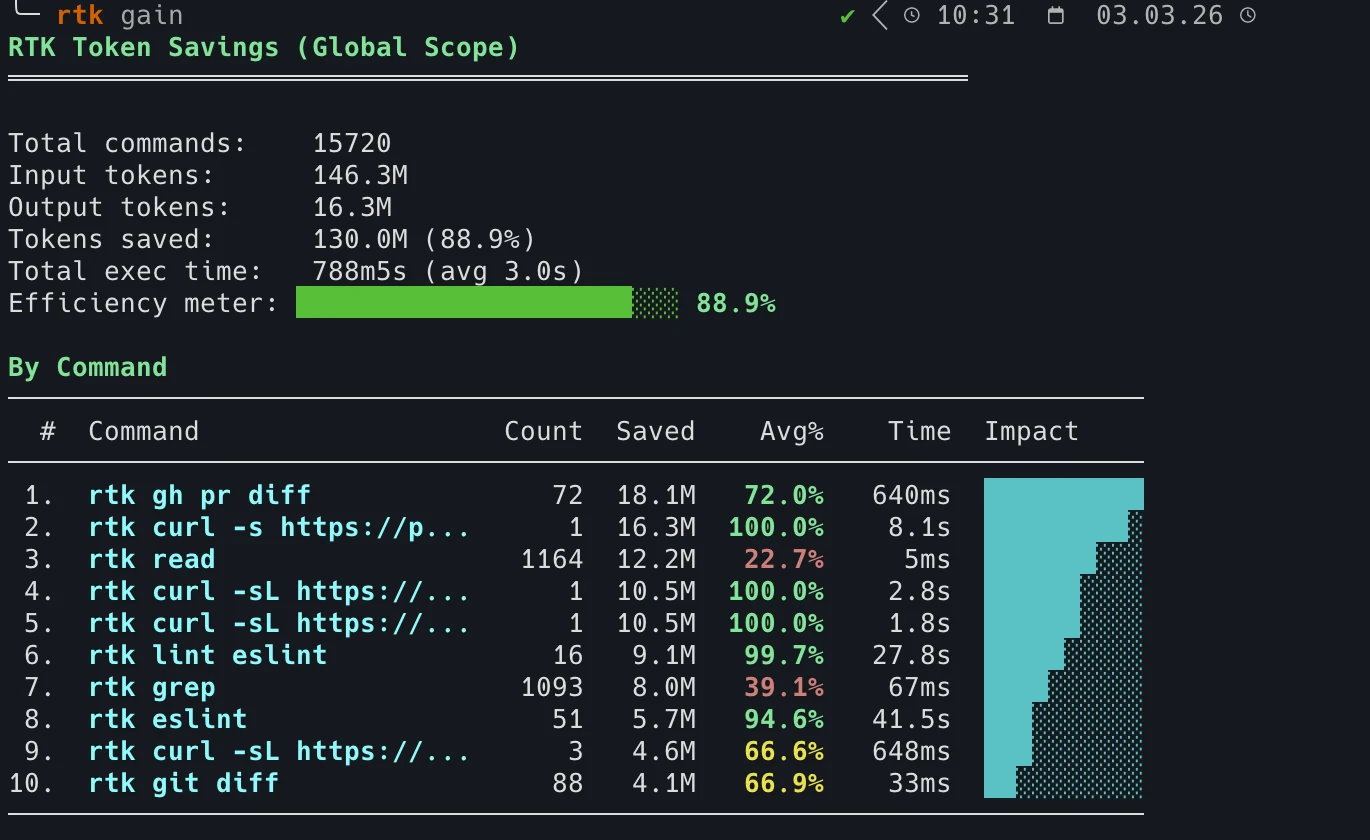
日常使用几周后:处理 15,720 条命令,节省 1.30 亿 token。
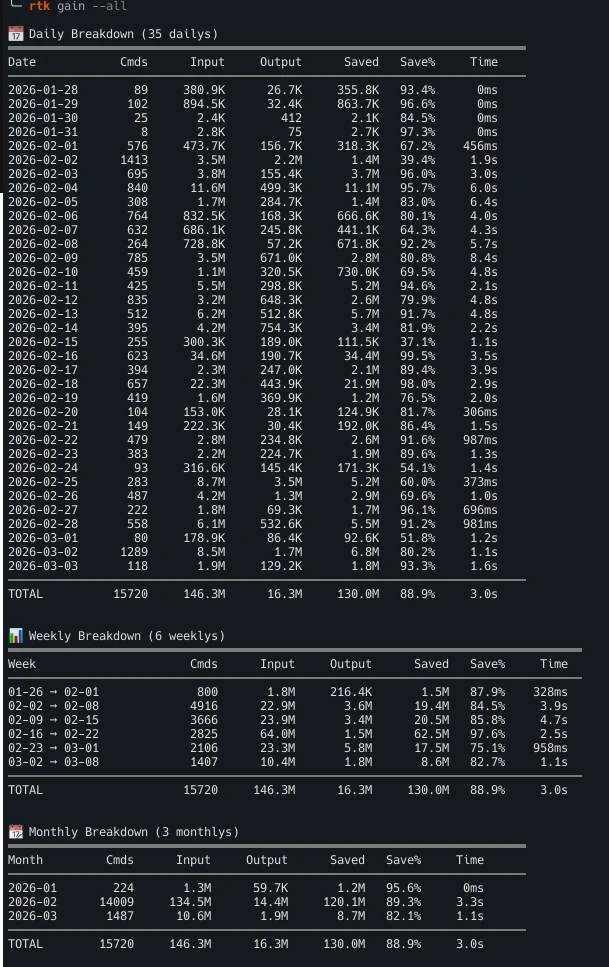
按命令查看每日、每周和每月统计。运行 rtk gain 查看你的数据。
#show-your-gains 频道查看其他开发者的节省数据 05 / 带来的改变
更高的效率
更少噪音。更有用的上下文。更少 token。
更少噪音
更干净的上下文窗口。
更好的推理
更相关的信息抵达代理。
更少 token
更少无用输出进入上下文。
兼容你的 AI 编程工具链
- Claude Code
- Cursor
- GitHub Copilot
- Codex
- Gemini CLI
- Windsurf
- Cline
- OpenCode
06 / 开始使用
30 秒即可运行
安装、激活钩子,之后每条命令都会被自动压缩。
快速安装
适用于 Linux 与 macOS 的一行命令。
$ curl -fsSL https://raw.githubusercontent.com/rtk-ai/rtk/refs/heads/master/install.sh | sh Homebrew
macOS 与 Linux。
$ brew install rtk-ai/tap/rtk $ brew upgrade rtk-ai/tap/rtk 然后激活自动重写钩子
$ rtk init --global --agent <name> 安装全局 shell 钩子()适用于 Aider、Gemini CLI、Codex、Windsurf 以及任何终端 AI 工具。
完整安装指南 →常见问题
高频提问
What is RTK (Rust Token Killer)?
RTK is an open-source CLI tool that compresses command outputs before they reach the AI context window. It cuts up to 90% of that output noise with zero configuration changes, which leaves more of the context window for reasoning and lowers the token cost of every command that runs. RTK is written in Rust, Apache 2.0 licensed, and works transparently with Claude Code, Cursor, and any terminal-based AI assistant.
How many tokens does RTK actually save?
On the commands RTK rewrites, output drops by 56% on average, and by up to 90% on the noisiest ones. Across the community that adds up to billions of tokens saved. The exact figure depends on the command, so the benchmarks page publishes the methodology and the per-command results, and the blog covers what independent studies measured, including the cases where RTK did not come out ahead. For your own numbers, run rtk gain after a few days of use.
Is RTK free? Are there usage limits?
RTK is completely free. It is open source under the Apache 2.0 license, with source code available on GitHub at github.com/rtk-ai/rtk. There are no usage limits, no API keys required and no accounts. Telemetry is opt-in: it is off until you explicitly enable it, and it collects no personal data. For teams, RTK Pro is available at pro.rtk-ai.app.
Which AI coding tools and commands does RTK support?
RTK works with Claude Code (Anthropic), Cursor, Gemini CLI, Aider, and any AI assistant that reads terminal output. It supports all major CLI commands: cargo test, pytest, go test, git diff, git status, git log, grep, find, ls, pnpm list, tsc, eslint, prisma, docker, kubectl, and more.
How does RTK work without changing my workflow?
Running rtk init --global installs a PreToolUse hook in Claude Code that automatically rewrites Bash commands to rtk equivalents at the proxy layer. You continue using your normal commands. RTK intercepts and compresses the output before it enters the context window, with no manual changes to prompts or workflows needed.
Does RTK affect code quality or AI reasoning accuracy?
No. RTK removes verbose boilerplate and repetitive output noise, not meaningful content. Test failures, error messages, diffs, and stack traces are preserved in full. The AI receives the same essential information with far less noise around it, which leaves more of the context window for reasoning.
RTK Pro
为你的团队打造的 AI 控制层
RTK 运行在每位开发者的机器上。RTK Pro 把这些机器连成统一的控制层,用成本分析、安全护栏与治理让整个团队一次就位。
-
可观测性
覆盖整个团队的详细分析:按项目和开发者查看用量与成本。看清真正的开销,并定义真实的 token 效率指标。
-
安全
每一位接入的开发者都在护栏之后工作:阻止密钥泄露,拦截危险操作,对敏感数据做匿名化。
-
治理
细粒度 RBAC、ACL 与项目管理。新成员只需连接一次即可全部就位:压缩、护栏、可观测性、skills、MCP。
CLI 始终保持免费与开源。