RTK
Your AI agent drowns in noise.
RTK cleans it up.
Clean context
Better agents
Diagram: a dense grid of tokens fills 86% of the AI context window, close to autocompact. It flows through the RTK filter, which strips the CLI output noise and leaves the meaningful lines: the same window back down to 73% used, with room to think.

Starred by developers at















+1,100 more companies
01 / The problem
You pay for everything your agent reads
Every turn, your agent sends its whole context back to the model: system prompt, tools, memory, the conversation, and every log, file and web page it has read. You pay for all of it, every time.
Illustration: tokens entering the context window over one coding session, layer by layer: the tool list and system prompt, the conversation, terminal output, files read, and web and MCP results. With RTK, the conversation and everything tools return shrink; the tool list and system prompt stay as they are. The total drops from 323k to 200k tokens, 38% less.
Illustrative example.
02 / The core
The compressor with 4M+ downloads
It rewrites your shell commands and cuts the noise out of their output before the agent reads it.
Built for developers
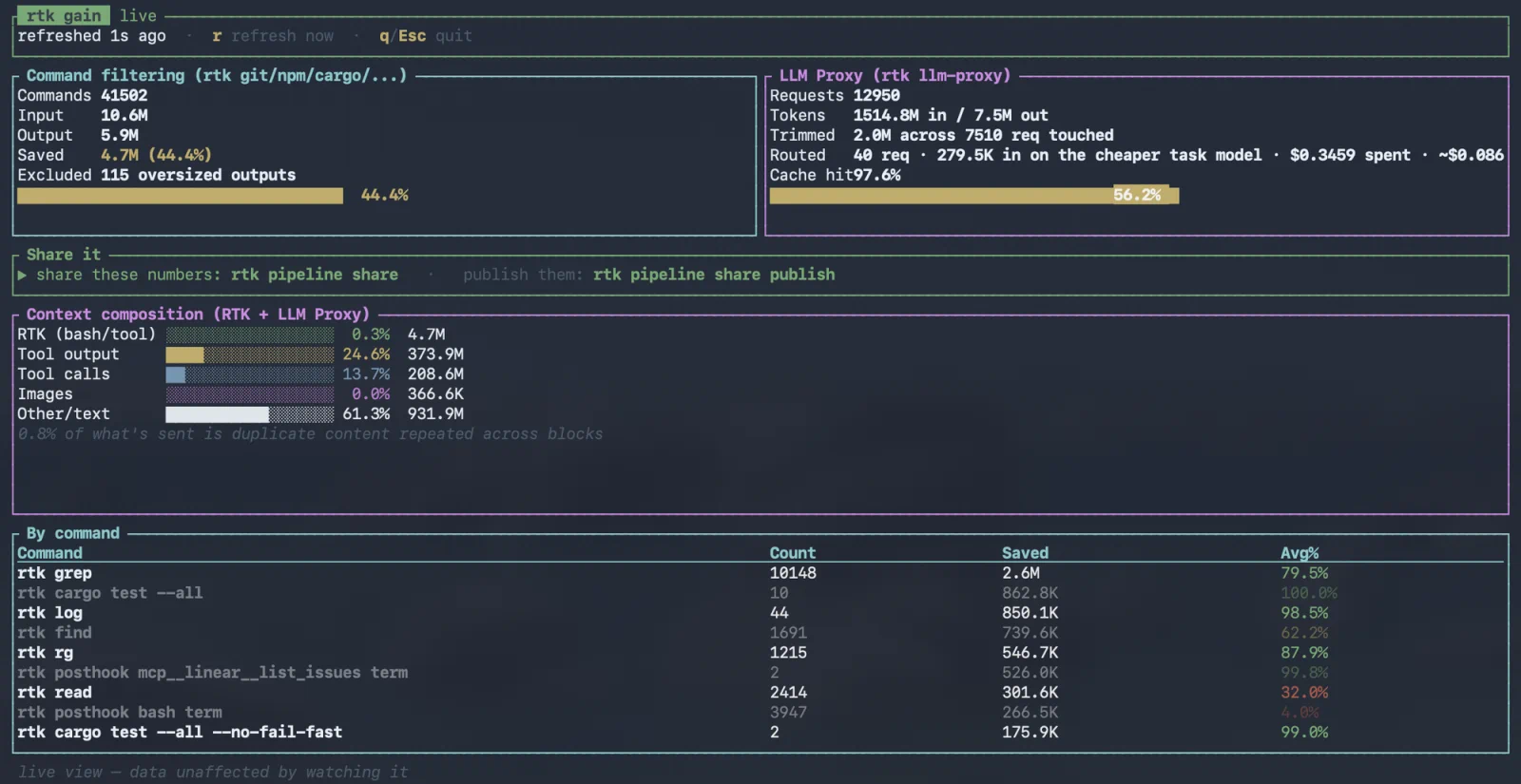
Live rtk gain from daily use: 41,502 commands, 4.7M tokens saved.
03 / RTK Engine
A full cost reduction engine
56% less command output on average, up to 90% on the noisiest. And with RTK Engine: route, build, plug in, share — in any agent.
Read the RTK Engine announcementCompress & FilterThe core
A 1,200-line lockfile becomes a short list of package names.
Route
A 4,000-line file is summarised by a small model; the agent gets the answer, not the file.
Build
“Leave diffs untouched, compress everything else.”
Plug in
Someone writes a method for their stack; every pipeline can use it.
Share
A team lead shares the pipeline; everyone drops it in.
Any agent
One file, used in Claude Code by one person and Cursor by another.
04 / Make it yours
One file. Any agent.
A rule says where RTK acts, when, and what it does. Start from a built-in pipeline, change one line, or write your own. Then share it as one file.
RTK ships its own pipelines in the same format, so nobody starts from a blank page. rtk pipeline show rtk:default prints exactly what runs today.
A pipeline file: it extends the built-in rtk:posthook and rtk:proxy pipelines and adds one rule — where: before the agent reads a file; when: the file is longer than 350 lines; what: route the read to a cheaper model.
Runs in Claude CodeCursorCodexGemini CLI +14
Acts in the agent — hooks on the API traffic — RTK Proxy, optional
05 / The evidence
Show your gains, share your pipelines
Run rtk gain to see what RTK saves you, then share the pipeline behind it in one command.
Illustration: rtk gain shows what RTK saved you, here 4.7M tokens and 44% less command output. rtk pipeline share turns the pipeline behind it into a link, private or public, that runs in Claude Code, Cursor, Codex and 15 more agents.
#show-your-gains on Discord Works with your AI coding stack
- Claude Code
- Cursor
- GitHub Copilot
- Codex
- Gemini CLI
- Windsurf
- Cline
- OpenCode
Fewer tokens. Lower bill. Same answers.
06 / Get started
Running in 30 seconds
Install, activate the hook, and every command is compressed automatically.
Upgrading from 0.x? Nothing changes until you add a line.
Quick install
One-liner for Linux & macOS.
$ curl -fsSL https://raw.githubusercontent.com/rtk-ai/rtk/refs/heads/master/install.sh | sh Homebrew
macOS & Linux.
$ brew install rtk-ai/tap/rtk $ brew upgrade rtk-ai/tap/rtk Then activate the auto-rewrite hook
$ rtk init --global Installs a PreToolUse hook in Claude Code settings.json: every Bash call is rewritten automatically.
Full install guide →$ rtk init --global --agent cursor Configures Cursor's .cursorrules to pipe Bash commands through rtk.
Full install guide →$ rtk init --global --agent <name> Installs a global shell hook: works with Aider, Gemini CLI, Codex, Windsurf, and any terminal AI tool.
Full install guide →Questions
Frequently asked
What is RTK (Rust Token Killer)?
RTK is a cost reduction engine for AI coding agents. It cleans what your agent reads at every tool call — shell output, file reads, search results, web pages, MCP calls — cutting up to 90% of command output noise, and it can hand heavy work to cheaper models. The battle-tested Bash compressor developers starred is the core of the engine. RTK is free to use, written in Rust, with the CLI open source under Apache 2.0, and works with Claude Code, Cursor, and 18 AI coding agents.
What is RTK Engine?
RTK Engine turns the battle-tested compressor into a full cost reduction engine. RTK can now compress every tool's output, not just shell commands, route heavy work to cheaper models, and let you build your own pipeline, plug in new methods, and share your setup as one file that works in any supported agent. Upgrading changes nothing: RTK works exactly as before until you add a line.
What is a pipeline?
One file of rules. Each rule reads like a sentence: where RTK acts, when, and what it does — for example, when the agent reads a file longer than 350 lines, send it to a cheaper model. RTK's own behaviour is written in the same format, so you never start from a blank page: pick a built-in pipeline, change one line, or write your own.
Can I share a pipeline with my team?
Yes. A pipeline is one file: share it, drop it in, and it works in any supported agent. The same file can be used in Claude Code by one person and Cursor by another.
Do I need to change anything when I upgrade to RTK Engine?
No. Install, run rtk init, and RTK works exactly as before. Nothing changes until you add a line to a pipeline. The compressor you already rely on is the core of the engine, not a feature that moved.
How many tokens does RTK actually save?
On the commands RTK rewrites, output drops by 56% on average, and by up to 90% on the noisiest ones. Across the community that adds up to billions of tokens saved. The exact figure depends on the command, so the benchmarks page publishes the methodology and the per-command results, and the blog covers what independent studies measured, including the cases where RTK did not come out ahead. For your own numbers, run rtk gain after a few days of use.
Is RTK free? Are there usage limits?
RTK is completely free. It is open source under the Apache 2.0 license, with source code available on GitHub at github.com/rtk-ai/rtk. There are no usage limits, no API keys required and no accounts. Routing to a cheaper model is optional and uses a model key you provide. Telemetry is opt-in: it is off until you explicitly enable it, and it collects no personal data. For teams, RTK Pro is available at pro.rtk-ai.app.
Which AI coding tools and commands does RTK support?
RTK works with 18 AI coding agents, including Claude Code (Anthropic), Cursor, GitHub Copilot, Codex, Gemini CLI, Windsurf, Cline and Aider — and the engine acts on every tool an agent uses: shell commands, file reads, search, web fetches and MCP calls. On the shell side it covers 125+ commands: cargo test, pytest, go test, git diff, git status, git log, grep, find, ls, pnpm list, tsc, eslint, prisma, docker, kubectl, and more.
How does RTK work without changing my workflow?
Running rtk init --global installs hooks inside your agent that act around each tool call: shell commands are automatically rewritten to rtk equivalents, and output is compressed before it enters the context window. If you turn it on, the RTK Proxy also acts on the API traffic, trimming what the agent sends to the model. You continue using your normal commands, with no manual changes to prompts or workflows needed.
Does RTK affect code quality or AI reasoning accuracy?
No. RTK removes verbose boilerplate and repetitive output noise, not meaningful content. Test failures, error messages, diffs, and stack traces are preserved in full. The AI receives the same essential information with far less noise around it, which leaves more of the context window for reasoning.
RTK Pro
The AI Control Layer for your team
RTK runs on each developer’s machine. RTK Pro connects those machines into one control layer and brings the whole team on board with cost analytics, security guardrails and governance.
-
Observability
Detailed analysis across the team: usage and cost per project and per developer. See what actually costs you, and define real token efficiency metrics.
-
Security
Every developer you onboard arrives behind guardrails: secret leaks blocked, dangerous actions stopped, sensitive data anonymized.
-
Governance
Fine-grained RBAC, ACLs and project management. A new team member connects once and arrives set up: compression, guardrails, observability, skills, MCP.
The CLI stays free and open source.