RTK
Dein KI-Agent ertrinkt im Rauschen.
RTK räumt auf.
Sauberer Kontext
Bessere Agenten
Diagramm: ein dichtes Token-Raster füllt 86 % des KI-Kontextfensters, kurz vor dem automatischen Komprimieren. Es läuft durch den RTK-Filter, der das CLI-Ausgaberauschen entfernt und die sinnvollen Zeilen behält: dasselbe Fenster sinkt auf 73 % Auslastung, mit Raum zum Denken.

Beliebt bei Entwicklern von


















+1,100 weitere Unternehmen
01 / Das Problem
Dein Kontextfenster ist wertvoll
KI-Agenten brauchen nicht mehr Output. Sie brauchen relevanteren Output.
Diagramm: ein Claude-Code-Kontextfenster spät in der Session: 86 % belegt, kurz vor dem Autocompact. Die festen Kosten sind winzig (System-Prompt und Tools 3 %, MCP-Tools 1 %, Memory-Dateien 1 %, Skills 0,5 %); gefüllt wird das Fenster vom Gesprächsverlauf mit 62 % und von CLI-Ausgabe und Logs mit 18 %. Nach dem RTK-Filter sinkt der CLI-Anteil auf 5 % und die Gesamtauslastung auf 73 %.
02 / Die Lösung
Installieren und vergessen
RTK ist eine dünne, offene Proxy-Schicht. Sie fügt deinem Workflow nichts hinzu: sie nimmt nur das Rauschen weg.
Für Entwickler gebaut
03 / In Aktion
Der Unterschied ist deutlich
Vergleiche echte Ausgaben vor und nach RTK und sieh, was gefiltert wird.
Warum wurde das entfernt?
$ cargo build
   Compiling libc v0.2.155
   Compiling proc-macro2 v1.0.85
   Compiling unicode-ident v1.0.12
   Compiling quote v1.0.36
   Compiling syn v2.0.66
   Compiling cfg-if v1.0.0
   Compiling once_cell v1.19.0
warning: unused variable: `raw`
  --> src/filter.rs:214:9
warning: field is never read: `depth`
  --> src/tree.rs:87:5
   Compiling serde v1.0.197
   Compiling anyhow v1.0.79
⋮ 1,026 more lines
    Finished dev [unoptimized] in 32.48s
$ rtk cargo build
✓ build finished in 32.4s
· 214 crates compiled
· 2 warnings: filter.rs:214, tree.rs:87
$ cargo test
running 184 tests
test filter::tests::collapses_dupes ... ok
test filter::tests::keeps_failures ... ok
test parse::tests::ansi_codes ... ok
test parse::tests::empty_input ... ok
test tree::tests::depth_limit ... ok
test gain::tests::daily_rollup ... ok
test proxy::tests::passthrough ... ok
test proxy::tests::exit_codes ... ok
test git::tests::short_status ... ok
test git::tests::diff_stat ... ok
⋮ 1,829 more lines
test result: ok. 184 passed; 0 failed
$ rtk cargo test
✓ 184 passed · 0 failed · 3 ignored
· finished in 3.2s
$ git status
On branch feat/filter-v2
Your branch is ahead of 'origin/feat/filter-v2'
  by 3 commits.
  (use "git push" to publish your commits)

Changes not staged for commit:
  (use "git add <file>..." to update)
  (use "git restore <file>..." to discard)
        modified:   src/filter.rs
        modified:   src/proxy.rs

Untracked files:
  (use "git add <file>..." to include)
        tests/fixtures/big_output.log
⋮ 21 more lines
$ rtk git status
feat/filter-v2 ↑3
M src/filter.rs
M src/proxy.rs
? tests/fixtures/big_output.log
$ find . -name "*.rs"
./src/main.rs
./src/filter.rs
./src/proxy.rs
./src/commands/git.rs
./src/commands/test.rs
./src/commands/grep.rs
./target/debug/build/libc-8f00…/out/lib.rs
./target/debug/build/serde-71ab…/out/de.rs
./target/debug/build/syn-90c1…/out/gen.rs
⋮ 303 more lines
$ rtk find "*.rs" .
29 matches (target/ excluded)
src/ 14 · commands/ 9 · tests/ 6
$ grep -rn "pub fn" src/
src/main.rs:12:pub fn main() {
src/filter.rs:31:pub fn compress(input: &str)
src/filter.rs:88:pub fn strip_ansi(s: &str)
src/proxy.rs:19:pub fn spawn(cmd: Command)
src/commands/git.rs:9:pub fn status()
src/commands/git.rs:44:pub fn diff()
src/commands/test.rs:15:pub fn run()
⋮ 210 more lines
$ rtk grep "pub fn" src/
67 matches across 12 files
filter.rs 12 · proxy.rs 8 · git.rs 6
main.rs 3 · 38 more
04 / Der Beleg
Miss deine rtk-Gewinne
Echte rtk gain-Ausgabe aus dem täglichen Einsatz.
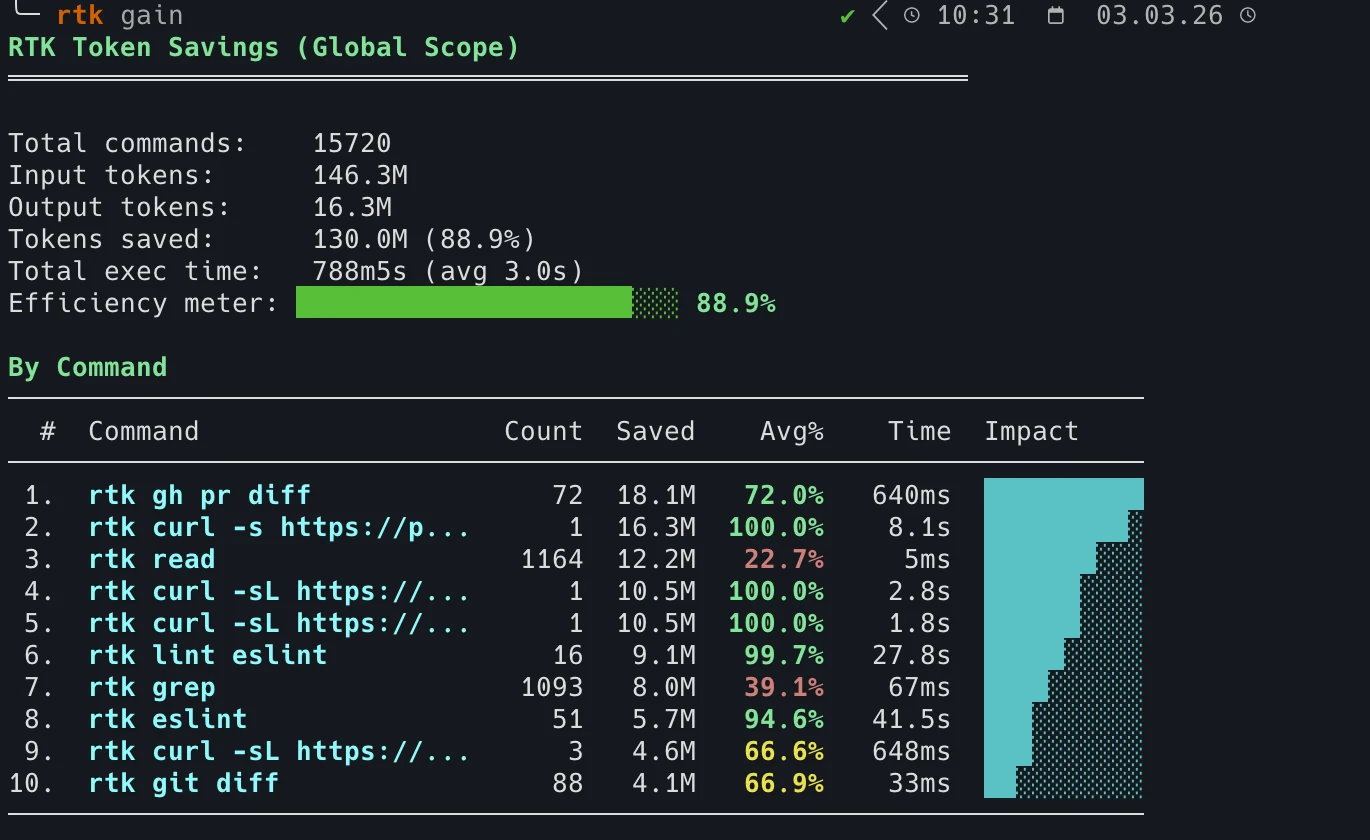
Nach einigen Wochen täglicher Nutzung: 15.720 Befehle verarbeitet, 130 Mio. Tokens gespart.
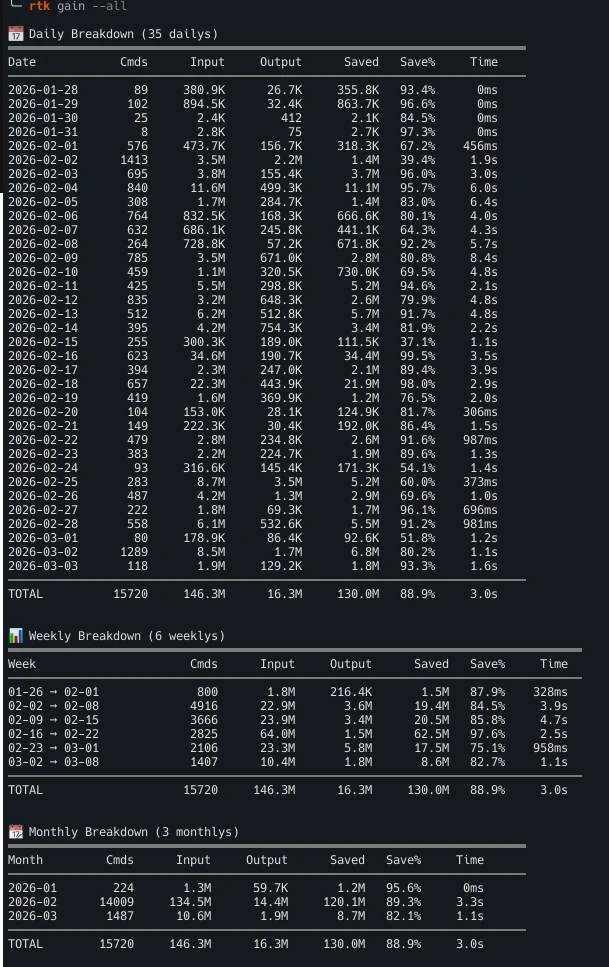
Tages-, Wochen- und Monatsstatistiken pro Befehl. Führe rtk gain aus, um deine zu sehen.
#show-your-gains auf Discord, was andere Entwickler sparen 05 / Die Wirkung
Mehr Effizienz
Weniger Rauschen. Nützlicherer Kontext. Weniger Tokens.
Weniger Rauschen
Sauberes Kontextfenster.
Besseres Reasoning
Der Agent erhält relevantere Informationen.
Weniger Tokens
Weniger unnötige Ausgaben landen im Kontext.
Kompatibel mit deinem KI-Stack
- Claude Code
- Cursor
- GitHub Copilot
- Codex
- Gemini CLI
- Windsurf
- Cline
- OpenCode
06 / Loslegen
In 30 Sekunden startklar
Installieren, Hook aktivieren, jeder Befehl wird automatisch komprimiert.
Schnellinstallation
Einzeiler für Linux & macOS.
$ curl -fsSL https://raw.githubusercontent.com/rtk-ai/rtk/refs/heads/master/install.sh | sh Homebrew
macOS & Linux.
$ brew install rtk-ai/tap/rtk $ brew upgrade rtk-ai/tap/rtk Aktiviere dann den Auto-Rewrite-Hook
$ rtk init --global Installiert einen PreToolUse-Hook in der settings.json von Claude Code: jeder Bash-Aufruf wird automatisch umgeschrieben.
Vollständige Anleitung →$ rtk init --global --agent cursor Konfiguriert die .cursorrules von Cursor, damit Bash-Befehle durch rtk laufen.
Vollständige Anleitung →$ rtk init --global --agent <name> Installiert einen globalen Shell-Hook: funktioniert mit Aider, Gemini CLI, Codex, Windsurf und jedem Terminal-KI-Tool.
Vollständige Anleitung →Fragen
Häufig gestellt
What is RTK (Rust Token Killer)?
RTK is an open-source CLI tool that compresses command outputs before they reach the AI context window. It cuts up to 90% of that output noise with zero configuration changes, which leaves more of the context window for reasoning and lowers the token cost of every command that runs. RTK is written in Rust, Apache 2.0 licensed, and works transparently with Claude Code, Cursor, and any terminal-based AI assistant.
How many tokens does RTK actually save?
On the commands RTK rewrites, output drops by 56% on average, and by up to 90% on the noisiest ones. Across the community that adds up to billions of tokens saved. The exact figure depends on the command, so the benchmarks page publishes the methodology and the per-command results, and the blog covers what independent studies measured, including the cases where RTK did not come out ahead. For your own numbers, run rtk gain after a few days of use.
Is RTK free? Are there usage limits?
RTK is completely free. It is open source under the Apache 2.0 license, with source code available on GitHub at github.com/rtk-ai/rtk. There are no usage limits, no API keys required and no accounts. Telemetry is opt-in: it is off until you explicitly enable it, and it collects no personal data. For teams, RTK Pro is available at pro.rtk-ai.app.
Which AI coding tools and commands does RTK support?
RTK works with Claude Code (Anthropic), Cursor, Gemini CLI, Aider, and any AI assistant that reads terminal output. It supports all major CLI commands: cargo test, pytest, go test, git diff, git status, git log, grep, find, ls, pnpm list, tsc, eslint, prisma, docker, kubectl, and more.
How does RTK work without changing my workflow?
Running rtk init --global installs a PreToolUse hook in Claude Code that automatically rewrites Bash commands to rtk equivalents at the proxy layer. You continue using your normal commands. RTK intercepts and compresses the output before it enters the context window, with no manual changes to prompts or workflows needed.
Does RTK affect code quality or AI reasoning accuracy?
No. RTK removes verbose boilerplate and repetitive output noise, not meaningful content. Test failures, error messages, diffs, and stack traces are preserved in full. The AI receives the same essential information with far less noise around it, which leaves more of the context window for reasoning.
RTK Pro
Der AI Control Layer für dein Team
RTK läuft auf der Maschine jedes Entwicklers. RTK Pro verbindet diese Maschinen zu einer einzigen Kontrollschicht und holt das ganze Team an Bord: Kostenanalyse, Security-Guardrails und Governance.
-
Observability
Detaillierte Auswertung über das ganze Team: Nutzung und Kosten pro Projekt und pro Entwickler. Seht, was wirklich kostet, und definiert echte Token-Effizienz-Metriken.
-
Sicherheit
Jede und jeder neu Onboardete arbeitet hinter Guardrails: Secret-Leaks blockiert, gefährliche Aktionen gestoppt, sensible Daten anonymisiert.
-
Governance
Feingranulares RBAC, ACLs und Projektverwaltung. Ein neues Teammitglied verbindet sich einmal und ist startklar: Kompression, Guardrails, Observability, Skills, MCP.
Das CLI bleibt kostenlos und Open Source.