RTK
AI エージェントはノイズに埋もれている。
RTK が片づける。
図:トークンの密なグリッドが AI コンテキストウィンドウの 86% を占め、自動圧縮の直前です。RTK フィルターを通ると CLI 出力のノイズが取り除かれ、意味のある行が残ります:同じウィンドウが 73% 使用まで下がり、考える余地が生まれます。

スターを付けた開発者の所属企業

















ほか 1,100 社
01 / 問題
コンテキストウィンドウは貴重です
AI エージェントに必要なのは、出力の量ではなく関連性です。
グラフ:セッション終盤の Claude Code コンテキストウィンドウ()使用率 86%、自動コンパクト間近です。固定コストはごくわずか(システムプロンプトとツール 3%、MCP ツール 1%、メモリファイル 1%、スキル 0.5%)で、実際に埋めているのは会話履歴 62% と CLI 出力・ログ 18%。RTK がフィルタリングすると CLI は 5%、全体は 73% まで下がります。
02 / 解決策
入れたら忘れていい
RTK は薄いオープンなプロキシ層です。ワークフローに何も足さず、ノイズだけを取り除きます。
開発者のために
03 / 実際の動作
違いは一目瞭然
RTK の前後で実際の出力を比較し、何が除かれるかを確認できます。
なぜ削除されたのか?
$ cargo build
   Compiling libc v0.2.155
   Compiling proc-macro2 v1.0.85
   Compiling unicode-ident v1.0.12
   Compiling quote v1.0.36
   Compiling syn v2.0.66
   Compiling cfg-if v1.0.0
   Compiling once_cell v1.19.0
warning: unused variable: `raw`
  --> src/filter.rs:214:9
warning: field is never read: `depth`
  --> src/tree.rs:87:5
   Compiling serde v1.0.197
   Compiling anyhow v1.0.79
⋮ 1,026 more lines
    Finished dev [unoptimized] in 32.48s
$ rtk cargo build
✓ build finished in 32.4s
· 214 crates compiled
· 2 warnings: filter.rs:214, tree.rs:87
$ cargo test
running 184 tests
test filter::tests::collapses_dupes ... ok
test filter::tests::keeps_failures ... ok
test parse::tests::ansi_codes ... ok
test parse::tests::empty_input ... ok
test tree::tests::depth_limit ... ok
test gain::tests::daily_rollup ... ok
test proxy::tests::passthrough ... ok
test proxy::tests::exit_codes ... ok
test git::tests::short_status ... ok
test git::tests::diff_stat ... ok
⋮ 1,829 more lines
test result: ok. 184 passed; 0 failed
$ rtk cargo test
✓ 184 passed · 0 failed · 3 ignored
· finished in 3.2s
$ git status
On branch feat/filter-v2
Your branch is ahead of 'origin/feat/filter-v2'
  by 3 commits.
  (use "git push" to publish your commits)

Changes not staged for commit:
  (use "git add <file>..." to update)
  (use "git restore <file>..." to discard)
        modified:   src/filter.rs
        modified:   src/proxy.rs

Untracked files:
  (use "git add <file>..." to include)
        tests/fixtures/big_output.log
⋮ 21 more lines
$ rtk git status
feat/filter-v2 ↑3
M src/filter.rs
M src/proxy.rs
? tests/fixtures/big_output.log
$ find . -name "*.rs"
./src/main.rs
./src/filter.rs
./src/proxy.rs
./src/commands/git.rs
./src/commands/test.rs
./src/commands/grep.rs
./target/debug/build/libc-8f00…/out/lib.rs
./target/debug/build/serde-71ab…/out/de.rs
./target/debug/build/syn-90c1…/out/gen.rs
⋮ 303 more lines
$ rtk find "*.rs" .
29 matches (target/ excluded)
src/ 14 · commands/ 9 · tests/ 6
$ grep -rn "pub fn" src/
src/main.rs:12:pub fn main() {
src/filter.rs:31:pub fn compress(input: &str)
src/filter.rs:88:pub fn strip_ansi(s: &str)
src/proxy.rs:19:pub fn spawn(cmd: Command)
src/commands/git.rs:9:pub fn status()
src/commands/git.rs:44:pub fn diff()
src/commands/test.rs:15:pub fn run()
⋮ 210 more lines
$ rtk grep "pub fn" src/
67 matches across 12 files
filter.rs 12 · proxy.rs 8 · git.rs 6
main.rs 3 · 38 more
04 / 実測データ
あなたの rtk 節約量を測る
開発者の日常利用から得た実際の rtk gain 出力。
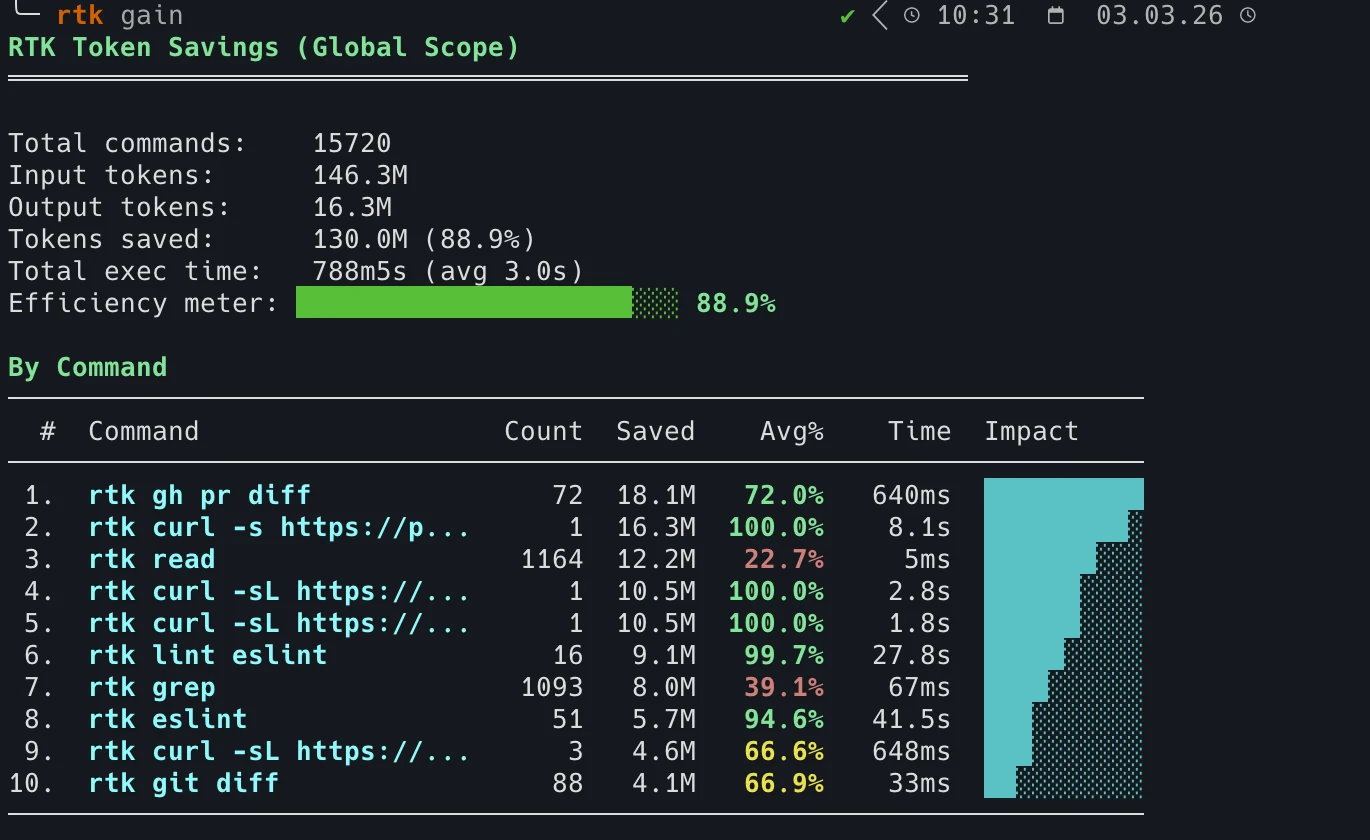
数週間の日常利用で:15,720 コマンドを処理し、1.30 億トークンを節約。
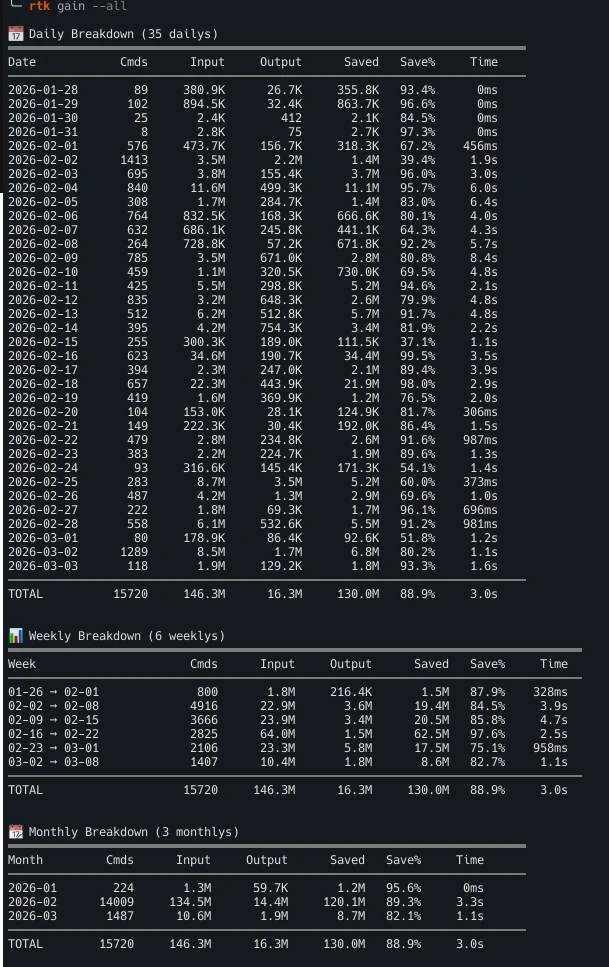
コマンド別の日次・週次・月次の統計。rtk gain を実行すると自分の数値を確認できます。
#show-your-gains で他の開発者の節約量を見る 05 / 効果
より高い効率
ノイズを減らし、文脈を活かし、トークンを節約。
ノイズ削減
クリーンなコンテキストウィンドウ。
推論の質が向上
より関連性の高い情報がエージェントに届きます。
トークン削減
不要な出力がコンテキストに入りません。
あなたの AI コーディング環境に対応
- Claude Code
- Cursor
- GitHub Copilot
- Codex
- Gemini CLI
- Windsurf
- Cline
- OpenCode
06 / はじめる
30 秒で動き出す
インストールしてフックを有効化すれば、あらゆるコマンドが自動で圧縮されます。
クイックインストール
Linux と macOS 向けのワンライナー。
$ curl -fsSL https://raw.githubusercontent.com/rtk-ai/rtk/refs/heads/master/install.sh | sh Homebrew
macOS と Linux。
$ brew install rtk-ai/tap/rtk $ brew upgrade rtk-ai/tap/rtk 次に自動書き換えフックを有効化
$ rtk init --global Claude Code の settings.json に PreToolUse フックを追加し、すべての Bash 呼び出しを自動で書き換えます。
完全インストールガイド →$ rtk init --global --agent <name> グローバルなシェルフックを導入()Aider、Gemini CLI、Codex、Windsurf などあらゆるターミナル AI ツールで動作します。
完全インストールガイド →よくある質問
よくいただく質問
What is RTK (Rust Token Killer)?
RTK is an open-source CLI tool that compresses command outputs before they reach the AI context window. It cuts up to 90% of that output noise with zero configuration changes, which leaves more of the context window for reasoning and lowers the token cost of every command that runs. RTK is written in Rust, Apache 2.0 licensed, and works transparently with Claude Code, Cursor, and any terminal-based AI assistant.
How many tokens does RTK actually save?
On the commands RTK rewrites, output drops by 56% on average, and by up to 90% on the noisiest ones. Across the community that adds up to billions of tokens saved. The exact figure depends on the command, so the benchmarks page publishes the methodology and the per-command results, and the blog covers what independent studies measured, including the cases where RTK did not come out ahead. For your own numbers, run rtk gain after a few days of use.
Is RTK free? Are there usage limits?
RTK is completely free. It is open source under the Apache 2.0 license, with source code available on GitHub at github.com/rtk-ai/rtk. There are no usage limits, no API keys required and no accounts. Telemetry is opt-in: it is off until you explicitly enable it, and it collects no personal data. For teams, RTK Pro is available at pro.rtk-ai.app.
Which AI coding tools and commands does RTK support?
RTK works with Claude Code (Anthropic), Cursor, Gemini CLI, Aider, and any AI assistant that reads terminal output. It supports all major CLI commands: cargo test, pytest, go test, git diff, git status, git log, grep, find, ls, pnpm list, tsc, eslint, prisma, docker, kubectl, and more.
How does RTK work without changing my workflow?
Running rtk init --global installs a PreToolUse hook in Claude Code that automatically rewrites Bash commands to rtk equivalents at the proxy layer. You continue using your normal commands. RTK intercepts and compresses the output before it enters the context window, with no manual changes to prompts or workflows needed.
Does RTK affect code quality or AI reasoning accuracy?
No. RTK removes verbose boilerplate and repetitive output noise, not meaningful content. Test failures, error messages, diffs, and stack traces are preserved in full. The AI receives the same essential information with far less noise around it, which leaves more of the context window for reasoning.
RTK Pro
チームのための AI コントロールレイヤー
RTK は各開発者のマシン上で動きます。RTK Pro はそれらのマシンをひとつのコントロールレイヤーにつなぎ、コスト分析、セキュリティガードレール、ガバナンスでチーム全体を立ち上げます。
-
オブザーバビリティ
チーム全体の詳細な分析:プロジェクト別・開発者別の利用状況とコスト。何が本当にコストなのかを把握し、実際のトークン効率指標を定義できます。
-
セキュリティ
オンボードした開発者は最初からガードレールの内側で作業します。シークレットの漏洩を防ぎ、危険な操作を止め、機微なデータを匿名化します。
-
ガバナンス
きめ細かい RBAC、ACL、プロジェクト管理。新しいメンバーは一度つなぐだけで、圧縮、ガードレール、オブザーバビリティ、スキル、MCP がすべて揃います。
CLI は無料でオープンソースのままです。